


Adding Instructors
A course may need more than one Instructor to complete the presentation of information. There may also be multiple Instructors indicated for teaching separate instances of a course. The Continuing Dental Education (CDE) website allows the Course Director to add Instructors to the Current Instructors list.
Follow these steps to select an instructor for a course:
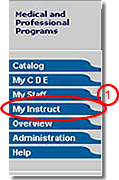
- Click the “My Instruct” tab in the main navigation
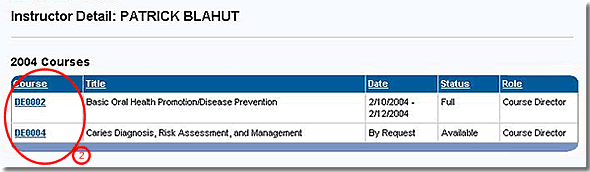
- Click the Course Number to go to the Course Detail page of the course requiring an Instructor
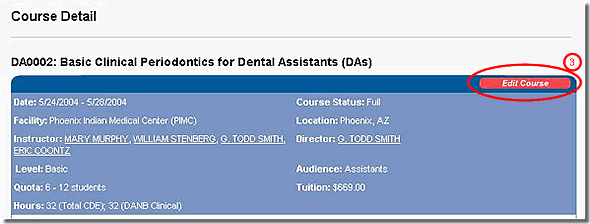
- Click the “Edit Course” button to go to the Edit Course wizard
Note: This step is only required after publication
- If it is not already active, click the “Instructor” tab at the top of the form
- Select an Instructor from the pull-down list provided
- If the Instructor you're looking for is not in the list, click the “Add an Instructor” link to enter information for a new Instructor and repeat step 5
- Click the “Add” button to add the Instructor to the Current Instructors list
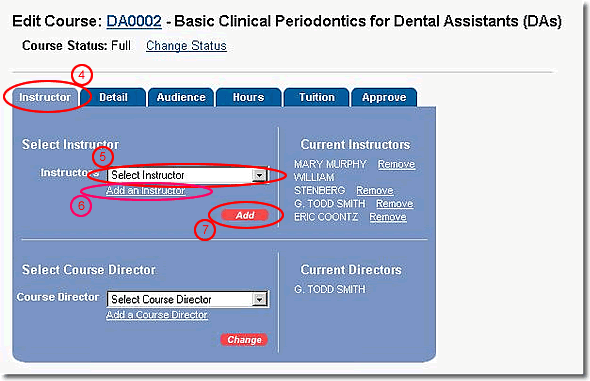
- Repeat steps 5, 6, and 7 as needed to complete the list of Instructors for the course
Note: You may also need to delete Instructors from a course.
